
digestblog.com

Articles

professional split screen illustration showing ai language model

Why LLMs Hallucinate: Understanding AI Hallucinations and How They Happen Internally

Why LLMs Hallucinate: Understanding AI Hallucinations and How They Happen Internally The Critical Problem of LLM Hallucination Large Language Models (LLMs) like GPT-4, Claude, and Gemini have revolutionized how we interact with artificial intelligence, generating human-like text that assists with writing, coding, research, and decision-making. Yet these powerful systems share a troubling weakness: LLM hallucination—the confident generation of false, fabricated, or nonsensical information presented as fact. Understanding LLM hallucination isn’t just an academic curiosity—it’s essential for anyone relying on AI systems for important tasks. When a medical professional consults an LLM about treatment options, when a lawyer uses AI for legal research, or when a business makes decisions based on AI-generated analysis, hallucinations can have serious consequences. A recent study found that even advanced models hallucinate in 3-27% of responses depending on the task, making this a critical reliability issue. What is LLM Hallucination? Defining the Problem LLM hallucination occurs when language models generate content that appears plausible and is presented confidently but is factually incorrect, nonsensical, or unfaithful to provided source material. Unlike human hallucinations involving sensory perception, LLM hallucination refers specifically to the generation of false information in text form. Types of LLM Hallucination Factual Hallucination: The model invents facts, statistics, dates, or events that never occurred. Example: claiming a historical event happened in 1987 when it actually occurred in 1995, or citing research papers that don’t exist. Intrinsic Hallucination: Generated content contradicts information explicitly provided in the prompt or context. If you provide a document stating “Revenue increased 15%” and the model responds “Revenue decreased,” that’s intrinsic hallucination. Extrinsic Hallucination: The model adds information not present in source material, going beyond what can be verified. While sometimes helpful, extrinsic hallucination becomes problematic when presented as fact rather than inference. Fabricated Citations: LLM hallucination frequently manifests as invented references—the model generates realistic-looking citations to papers, books, or sources that don’t exist, often with convincing titles, authors, and publication details. Confabulation: The model fills knowledge gaps with plausible-sounding but invented details rather than acknowledging uncertainty. This represents perhaps the most dangerous form of LLM hallucination because the output appears coherent and authoritative. Why LLM Hallucination Matters The consequences of LLM hallucination extend beyond mere inconvenience: Medical Context: Hallucinated drug interactions or dosage information could endanger patient safety. Healthcare professionals must verify all AI-generated medical information against authoritative sources. Legal Applications: Lawyers relying on hallucinated case citations face professional sanctions. Several documented cases involve attorneys submitting briefs containing fabricated legal precedents generated by LLMs. Financial Decisions: Business leaders making strategic decisions based on hallucinated market data or financial projections risk significant financial losses and reputational damage. Academic Integrity: Students and researchers citing hallucinated sources undermine scholarly work and face academic consequences when fabricated references are discovered. Technical Development: Developers implementing hallucinated code snippets or following fabricated technical documentation waste time debugging non-functional solutions and may introduce security vulnerabilities. The Architecture Behind LLM Hallucination: How Language Models Work Understanding why LLM hallucination occurs requires grasping how these models function internally. Large Language Models don’t “know” facts or “understand” truth—they predict likely text continuations based on statistical patterns learned from training data. Transformer Architecture Fundamentals Modern LLMs build upon the Transformer architecture, introduced in 2017. This neural network design processes text through multiple layers of attention mechanisms, enabling the model to consider relationships between words across long sequences. Key Components: Embedding Layer: Converts words into high-dimensional numerical vectors, mapping semantic relationships (words with similar meanings cluster in vector space). Attention Mechanism: Allows the model to weigh which previous words are most relevant when predicting the next word. The phrase “bank” receives different attention weights in “river bank” versus “savings bank.” Feed-Forward Networks: Process attended information through learned transformations, capturing complex patterns beyond simple word associations. Output Layer: Produces probability distribution over vocabulary—for each position, the model assigns probabilities to thousands of possible next words. This architecture creates powerful pattern recognition but lacks mechanisms for truth verification, setting the stage for LLM hallucination. Training Process and Knowledge Acquisition LLMs undergo training on massive text corpora—billions or trillions of words from books, websites, research papers, and online discussions. During this process, the model adjusts billions of parameters (GPT-3 has 175 billion, GPT-4 rumored to have over a trillion) to minimize prediction errors. What Actually Happens: The model learns statistical associations: “Paris” frequently appears near “France” and “capital,” so it learns these correlations. It discovers that sentences about “photosynthesis” often mention “chlorophyll” and “plants.” These patterns enable impressive text generation but don’t constitute genuine understanding or factual knowledge storage. Critical Limitation: The model has no database of facts, no verification mechanism, no connection to reality beyond training text. When generating responses, it samples from learned probability distributions without checking factual accuracy. This fundamental design enables LLM hallucination—the model generates what’s statistically likely, not what’s factually true. Next-Token Prediction: The Core Mechanism At every generation step, the LLM performs next-token prediction: given previous text, predict the most likely next word (or subword token). This seemingly simple mechanism, repeated thousands of times, produces coherent text but also enables hallucination. Generation Process: Where LLM Hallucination Emerges: The model never asks “Is this true?” It only asks “Is this statistically plausible given my training data?” When faced with knowledge gaps, rather than admitting uncertainty, the model continues generating plausible-sounding text by following learned patterns. This produces confident hallucinations. Internal Mechanisms: Why LLM Hallucination Happens Multiple technical factors converge to create LLM hallucination. Understanding these mechanisms reveals why eliminating hallucinations entirely remains an unsolved challenge in AI research. Mechanism 1: Training Data Limitations and Biases Knowledge Cutoff: LLMs freeze knowledge at training completion. GPT-4’s training data ends in April 2023—the model cannot know events afterward and may hallucinate when asked about recent developments, generating plausible-sounding but invented information about post-cutoff events. Data Quality Issues: Training corpora contain misinformation, contradictions, and errors. The model learns from both accurate and inaccurate sources without distinguishing between them. When multiple conflicting “facts” exist in training data, the model may blend them, creating hallucinations.

Why LLMs Hallucinate: Understanding AI Hallucinations and How They Happen Internally Read More »

a realistic illustration of object detection in

Object Detection in Computer Vision: How Machines Learn to See and Identify the World

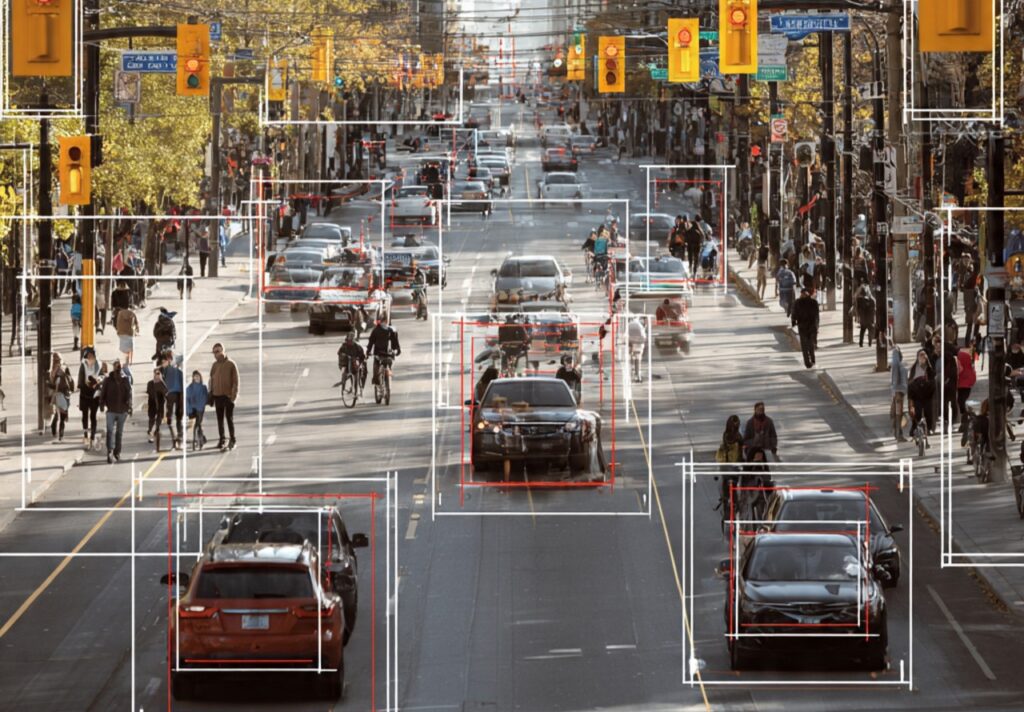
Object Detection in Computer Vision: How Machines Learn to See and Identify the World Object detection in computer vision sits at the heart of modern artificial intelligence. It is the reason machines can drive cars, assist doctors, monitor cities, and understand images beyond surface-level recognition. While many people casually mention object detection as just another AI feature, its depth, complexity, and real-world importance are often underestimated. Unlike simple image classification, object detection forces machines to deal with reality as it actually is—messy, crowded, unpredictable, and dynamic. Real images rarely contain one clear subject. Instead, they include multiple objects, partial views, occlusions, and varying lighting conditions. Teaching a machine to navigate this chaos is no small task. This article does not skim the surface. Instead, it explores object detection in computer vision from the ground up—conceptually, technically, and practically. You will understand not just what object detection is, but why it works, where it fails, and how it continues to evolve. Understanding Object Detection at Its Core At its most basic level, object detection in computer vision answers two essential questions: These two questions may sound simple, but together they create one of the most demanding problems in artificial intelligence. Object detection systems take an image or video frame as input and produce structured output. This output usually consists of bounding boxes drawn around detected objects, class labels describing what each object is, and confidence scores indicating how sure the model is about each prediction. What makes this task difficult is not identifying objects in isolation, but identifying many objects at once, often under imperfect conditions. Why Object Detection Is Fundamentally Different from Seeing Humans detect objects effortlessly. We instantly recognize a car, a person, or a bicycle without consciously thinking about shapes, pixels, or boundaries. However, machines do not have this intuition. For a computer, an image is nothing more than a grid of numbers. Every color, shadow, and texture must be translated into mathematical patterns. Therefore, object detection is not about eyesight—it is about pattern recognition at scale. Moreover, object detection requires spatial understanding. The system must distinguish between background and foreground, separate overlapping objects, and identify edges accurately. This spatial reasoning makes object detection far more complex than classification. The Evolution of Object Detection Object detection did not appear fully formed. Instead, it evolved through multiple generations of techniques. Early Rule-Based Methods Early object detection relied on handcrafted rules. Engineers manually designed features such as edges, corners, and color histograms. These systems worked in controlled environments but failed in real-world scenarios. Feature-Based Learning Approaches Later, methods such as Haar cascades and HOG (Histogram of Oriented Gradients) improved detection accuracy. These techniques enabled early face detection systems but still lacked generalization. Deep Learning Revolution The real breakthrough came with deep learning. Convolutional neural networks allowed machines to learn features automatically from data. As a result, object detection became more accurate, scalable, and adaptable. This shift transformed object detection in computer vision from a research problem into a practical technology. How Object Detection Systems Actually Work Although modern object detection models vary in architecture, they follow a general pipeline. Image Representation and Preprocessing Images are resized and normalized before being fed into the network. This ensures consistent input dimensions and numerical stability. Feature Extraction Using CNNs Convolutional layers scan the image to detect low-level features like edges and textures. As layers deepen, they capture higher-level patterns such as shapes and object parts. Region Proposal or Dense Prediction At this stage, the model identifies regions where objects might exist. Some models generate region proposals, while others predict bounding boxes directly across the image. Bounding Box Regression The model predicts precise coordinates for each bounding box. These coordinates define the object’s location within the image. Object Classification Each bounding box is assigned a class label. Confidence scores help filter unreliable detections. Non-Maximum Suppression Overlapping detections are reduced so that each object appears only once. This step prevents duplicate bounding boxes. Bounding Boxes: The Language of Object Detection Bounding boxes are rectangular frames that enclose detected objects. They may seem simple, but their accuracy is critical. A poorly aligned bounding box can mislead downstream systems. For example, in autonomous driving, an incorrect box around a pedestrian can result in delayed braking. Therefore, bounding box precision is a key performance metric in object detection in computer vision. Major Object Detection Architectures Explained Several architectures dominate the field today, each with its own philosophy. R-CNN Family Region-based Convolutional Neural Networks introduced the idea of separating region proposal from classification. Faster R-CNN improved speed by integrating region proposals directly into the network. These models are highly accurate but computationally expensive. YOLO (You Only Look Once) YOLO treats object detection as a single regression problem. Instead of proposing regions, it predicts bounding boxes and classes directly. This approach enables real-time detection, making YOLO popular in robotics and surveillance. SSD (Single Shot Detector) SSD balances speed and accuracy. It detects objects at multiple scales, making it effective for varied object sizes. Each architecture reflects different trade-offs between speed, accuracy, and resource usage. Training Object Detection Models Training an object detection model requires careful planning. Dataset Annotation Images must be labeled with bounding boxes and class names. This process is labor-intensive and often the most expensive part of training. Loss Functions Object detection uses multi-part loss functions that penalize: Balancing these losses is crucial. Hardware Requirements Training typically requires GPUs or specialized accelerators. Large datasets and deep models demand significant computational power. Evaluation Metrics in Object Detection Unlike simple accuracy, object detection uses advanced metrics. Intersection over Union (IoU) IoU measures how well a predicted bounding box overlaps with the ground truth. Higher IoU indicates better localization. Precision and Recall Precision measures correctness, while recall measures completeness. Both are essential for reliable detection. Mean Average Precision (mAP) mAP summarizes detection performance across multiple classes and thresholds. It is the standard benchmark metric. Real-World Applications in Detail Autonomous Driving Systems Self-driving cars rely on object detection in computer vision

Object Detection in Computer Vision: How Machines Learn to See and Identify the World Read More »

professional split screen visualization showing transformation from text

AI Image Generation: Master the Art of Creating Stunning Visuals in 2025

Understanding AI Image Generation: AI image generation uses deep learning models trained on millions of images to create new visuals from text descriptions. Unlike stock photos or template-based tools, generative AI creates entirely original images, giving you unlimited creative possibilities without photography equipment, design skills, or expensive software. Modern AI image generation systems like DALL-E, Midjourney, and Stable Diffusion employ diffusion models—neural networks that learn to reverse noise addition, gradually transforming random pixels into coherent images matching your description. This technology represents a fundamental shift in visual content creation, democratizing professional-quality image production. The Three Pillars of Successful AI Image Generation Prompt Engineering: Crafting descriptions that communicate your vision clearly and comprehensively to AI systems. Style Control: Understanding artistic elements—composition, lighting, color theory, art movements—that shape visual aesthetics. Iterative Refinement: Systematically improving results through testing, adjustment, and learning from outputs. Mastering these pillars transforms random experimentation into reliable, professional workflows. Choosing the Right AI Image Generation Platform DALL-E 3: Best for Precise Prompt Following OpenAI’s DALL-E 3 excels at interpreting complex prompts accurately. The system understands nuanced instructions about composition, relationships between objects, and specific details better than most alternatives. Integration with ChatGPT enables conversational refinement, making it ideal for users who want to iterate through natural language dialogue. Strengths: Best For: Business presentations, educational content, precise concept visualization, users prioritizing ease of use Limitations: Less artistic stylization compared to Midjourney, smaller output resolution options, usage requires ChatGPT Plus subscription Midjourney: Best for Artistic and Aesthetic Results Midjourney produces visually stunning, artistically coherent images with exceptional aesthetic quality. The platform attracts artists and designers seeking dramatic, gallery-worthy results with strong compositional sense and sophisticated color palettes. Strengths: Best For: Marketing campaigns, social media content, artistic projects, fantasy and sci-fi illustration, anyone prioritizing visual impact Limitations: Discord-based interface can feel complicated initially, requires subscription, less precise with technical or specific requirements Stable Diffusion: Best for Customization and Control Stable Diffusion offers unmatched flexibility through open-source accessibility. Run it locally, fine-tune models on custom data, or integrate into applications—possibilities extend far beyond simple text-to-image generation. Strengths: Best For: Developers, technical users, those needing commercial flexibility, projects requiring specific style replication, privacy-sensitive applications Limitations: Steeper learning curve, requires technical setup for best results, inconsistent quality without proper configuration, hardware demands for local operation Emerging Platforms Worth Watching Adobe Firefly: Integrated into Creative Cloud with commercial safety guarantees, trained on licensed Adobe Stock content. Excellent for businesses concerned about copyright. Leonardo.ai: Combines ease of use with advanced controls, offering game asset generation and consistent character creation features particularly valuable for game developers and storytellers. Playground AI: Free tier with generous limits, user-friendly interface, and social features for discovering prompt techniques from other creators. The Science of Prompt Engineering for AI Image Generation Effective prompts make the difference between mediocre results and professional-quality images. Understanding prompt structure transforms frustrating experimentation into predictable success. Anatomy of a Powerful Prompt Subject (What): The main focus of your image Style (How it looks): Artistic direction and aesthetic Composition (Arrangement): Visual structure and framing Lighting (Mood): Illumination that shapes atmosphere Color Palette (Emotion): Color choices conveying feeling Technical Settings (Photography terms): Camera-specific details for photorealistic results Practical Prompt Examples with Analysis Basic Prompt: “a dog in a park” Professional Prompt: “Golden retriever puppy playing with a red ball in a sunlit meadow, shallow depth of field, bokeh background, warm afternoon light, shot with 85mm lens at f/2.8, professional pet photography style, joyful and energetic mood” Why it works: Basic Prompt: “modern office” Professional Prompt: “Minimalist Scandinavian office interior, floor-to-ceiling windows with city skyline view, light wood desk with iMac, Barcelona chair, indoor plants, soft natural lighting, architectural photography, clean lines, neutral color palette with blue accents, shot on Phase One camera, crisp and professional” Why it works: Advanced Prompting Techniques Weighted Phrases: Some platforms allow emphasizing important elements Negative Prompts: Specify what to exclude Style Mixing: Combine multiple artistic references Aspect Ratio Control: Match your intended use Mastering Artistic Styles in AI Image Generation Photography Styles That Produce Professional Results Portrait Photography: Product Photography: Landscape Photography: Illustration Styles for Creative Projects Children’s Book Illustration: Technical Illustration: Fantasy Art: Leveraging Art Movements and Famous Artists Referencing art movements provides AI image generation systems with rich stylistic context: Impressionism: “Claude Monet style” creates soft, light-focused images with visible brushstrokes and atmospheric quality—perfect for romantic, dreamy visuals. Art Deco: Geometric patterns, bold colors, luxurious feel—excellent for vintage-inspired branding, posters, and elegant designs. Surrealism: “Salvador Dali style” produces dreamlike, impossible scenes—ideal for attention-grabbing advertising or creative portfolio pieces. Minimalism: Clean, simple compositions with limited color palettes—outstanding for modern branding, user interface elements, or contemporary art. Ukiyo-e: Japanese woodblock print style, flat colors, distinctive linework—creates unique, culturally rich imagery perfect for editorial content. Troubleshooting Common AI Image Generation Problems Problem: Distorted Faces or Hands Why it happens: Human anatomy is complex, and AI models sometimes struggle with finger count, proportions, or facial symmetry, especially at certain angles. Solutions: Problem: Text in Images Appears Garbled Why it happens: Current AI image generation models don’t truly understand text; they approximate letterforms based on training data patterns. Solutions: Problem: Inconsistent Results Across Generations Why it happens: AI image generation involves randomness by design; each generation starts from different noise patterns. Solutions: Problem: AI Adding Unwanted Elements Why it happens: Training data associations cause AI to include commonly co-occurring elements. Solutions: Problem: Wrong Mood or Atmosphere Why it happens: Insufficient emotional or atmospheric description in prompts. Solutions: Professional Workflows for Different Use Cases Marketing Campaign Visuals Workflow Step 1: Define Requirements Step 2: Create Mood Board Step 3: Develop Base Prompts Step 4: Generate Variations Step 5: Refine Winners Step 6: Post-Processing Blog and Content Creation Workflow Efficient Process: Time-Saving Tips: Product Visualization Workflow Creating Compelling Product Images: Iterate Through: Social Media Content Calendar Workflow Monthly Batch Creation System: Week 1: Planning and prompt development Week 2: Bulk generation Week 3: Selection and editing Week 4: Scheduling and buffer building Result: Month of content ready, stress-free posting,

AI Image Generation: Master the Art of Creating Stunning Visuals in 2025 Read More »

a modern illustration representing natural language processing (1)

Natural Language Processing: Complete Guide for Beginners and Experts in 2025

Natural Language Processing: Complete Guide for Beginners and Experts in 2025 Introduction to Natural Language Processing Natural language processing (NLP) is one of the most powerful and rapidly evolving fields within artificial intelligence today. In simple terms, natural language processing enables computers to understand, interpret, and generate human language in a meaningful and useful way. As technology continues to advance, NLP has become deeply embedded in our daily lives. For example, voice assistants like Siri and Alexa, language translation tools, chatbots, and sentiment analysis systems all rely heavily on NLP. Consequently, understanding NLP is no longer optional—it has become essential. Moreover, NLP is now a critical skill for developers, data scientists, marketers, and business professionals. Therefore, this complete guide explores NLP fundamentals, techniques, applications, challenges, and future trends, making it useful for both beginners and experienced practitioners in 2025. What is Natural Language Processing? NLP is a field of artificial intelligence that combines computational linguistics, machine learning, and deep learning to enable machines to understand human language. Unlike traditional programming, where computers follow strict rules, NLP allows systems to learn from data. As a result, machines can understand meaning, intent, sentiment, and context rather than relying solely on keywords. In other words, NLP bridges the communication gap between humans and computers, making interactions more natural and efficient. Evolution of Natural Language Processing Initially, NLP systems were rule-based and relied on manually written grammar rules. However, these early systems struggled with ambiguity and scalability. Later, statistical methods and machine learning techniques significantly improved NLP performance. Eventually, deep learning models such as Word2Vec, BERT, GPT, and Transformer architectures completely transformed the field. Today, NLP models can perform tasks with near-human accuracy, especially when trained on large-scale datasets. Core Components of NLP Tokenization First, tokenization breaks text into smaller units called tokens. These tokens may be words, subwords, or characters. As a result, machines can process text more efficiently and accurately. Part-of-Speech Tagging Next, part-of-speech tagging assigns grammatical roles—such as nouns, verbs, and adjectives—to each word. Consequently, NLP systems gain a better understanding of sentence structure. Named Entity Recognition Similarly, named entity recognition identifies names of people, organizations, locations, dates, and quantities. Therefore, it plays a key role in information extraction and question answering systems. Sentiment Analysis Meanwhile, sentiment analysis determines whether text expresses positive, negative, or neutral emotion. Because of this, businesses frequently use NLP for brand monitoring and customer feedback analysis. Syntactic Parsing In addition, syntactic parsing analyzes grammatical relationships between words. As a result, machines can interpret sentence structure more deeply. Semantic Analysis Finally, semantic analysis focuses on meaning. Rather than analyzing words alone, it understands context, relationships, and intent—making NLP far more intelligent. Natural Language Processing Techniques Rule-Based Techniques Although rule-based NLP methods require manual effort, they remain useful for limited, well-defined tasks. However, they are often combined with machine learning for better results. Statistical Methods Statistical NLP techniques use probability-based models. For instance, Hidden Markov Models and Conditional Random Fields improved early NLP systems significantly. Machine Learning Approaches Machine learning allowed NLP systems to learn patterns directly from data. Consequently, tasks such as classification, clustering, and tagging became far more accurate. Deep Learning Models Currently, deep learning dominates NLP. Models like LSTMs, RNNs, and Transformers handle long-term dependencies and complex language patterns effectively. Transfer Learning Moreover, transfer learning enables developers to fine-tune pre-trained NLP models for specific tasks. As a result, training time and data requirements are drastically reduced. Applications of Natural Language Processing Chatbots and Virtual Assistants NLP powers modern chatbots and virtual assistants. Therefore, businesses use them to automate customer support and enhance user experience. Machine Translation Additionally, NLP enables real-time translation systems such as Google Translate and DeepL, allowing seamless communication across languages. Text Summarization Furthermore, NLP-based summarization tools help users quickly understand long documents by extracting or generating concise summaries. Question Answering Systems Question answering systems rely on natural language processing to interpret queries and deliver precise answers from large datasets. Business Sentiment Analysis As a result of NLP, businesses can analyze customer opinions from reviews, surveys, and social media at scale. Information Extraction Similarly, NLP extracts structured information from unstructured text, making data easier to analyze and utilize. Popular NLP Libraries and Tools Challenges in NLP Despite major progress, NLP still faces challenges. For example, understanding sarcasm, handling multilingual data, reducing bias, and managing high computational costs remain difficult. However, ongoing research continues to address these limitations. The Future of Natural Language Processing Looking ahead, natural language processing will become more conversational, explainable, and multimodal. Moreover, support for low-resource languages will expand significantly. As a result, NLP will continue to reshape industries such as healthcare, education, and business. Conclusion In conclusion, natural language processing is transforming how humans interact with machines. From chatbots and translations to sentiment analysis and content recommendations, NLP is everywhere. Therefore, learning natural language processing today prepares you for the future of artificial intelligence. Whether you are a student, developer, or business professional, mastering NLP fundamentals opens doors to exciting opportunities in 2025 and beyond.

Natural Language Processing: Complete Guide for Beginners and Experts in 2025 Read More »

professional futuristic ai technology illustration showing a

Grok AI Guide: Writing, Coding & Image Generation

Grok AI: The Ultimate Guide to AI-Powered Writing, Coding, and Image Generation Introduction to Grok AI Grok AI has emerged as one of the most talked-about artificial intelligence platforms in the rapidly evolving landscape of AI technology. Developed by xAI, Elon Musk’s artificial intelligence company, Grok represents a significant advancement in conversational AI and multimodal capabilities. This comprehensive guide explores how Grok AI is revolutionizing content creation, software development, and visual design through its powerful writing, coding, and image generation features. What is Grok AI? Grok AI is an advanced artificial intelligence chatbot designed to understand and generate human-like text, write functional code, and create stunning images. Unlike traditional AI assistants, Grok distinguishes itself through its unique personality, real-time information access, and integration with the X platform (formerly Twitter). The name “Grok” comes from Robert Heinlein’s science fiction novel “Stranger in a Strange Land,” meaning to understand something thoroughly and intuitively. The AI model powers various creative and technical tasks, making it an invaluable tool for writers, developers, designers, marketers, and business professionals. With its ability to process natural language queries and deliver contextually relevant responses, Grok AI has become a go-to solution for individuals and organizations seeking to enhance productivity and creativity. Grok AI for Writing: Transform Your Content Creation Content Writing Capabilities Grok AI excels at generating high-quality written content across multiple formats and styles. Whether you need blog posts, articles, marketing copy, social media content, or creative fiction, Grok’s natural language processing capabilities deliver impressive results. Key Writing Features: SEO Content Optimization One of Grok AI’s standout features is its ability to create SEO-friendly content that ranks well in search engines. The AI understands keyword placement, content structure, meta descriptions, and other essential SEO elements that help improve online visibility. When using Grok for SEO writing, you can: Content Editing and Refinement Beyond content creation, Grok AI serves as an excellent editing assistant. It can proofread text, suggest improvements, enhance clarity, adjust tone, and ensure grammatical accuracy. This makes it valuable for writers looking to polish their work before publication. Grok AI for Coding: Your AI Programming Assistant Programming Language Support Grok AI demonstrates impressive capabilities in software development and coding tasks. The platform supports numerous programming languages, making it versatile for developers working across different technology stacks. Supported Languages Include: Code Generation and Development Grok AI can generate functional code from natural language descriptions, significantly accelerating the development process. Developers can describe what they want to build, and Grok produces working code with proper syntax and logic. Coding Capabilities: Debugging and Code Review Beyond writing new code, Grok AI assists with debugging and code optimization. Developers can paste problematic code, and the AI identifies errors, suggests fixes, and explains the underlying issues. This feature proves invaluable for learning programming concepts and troubleshooting complex problems. Code Documentation Grok AI automatically generates comprehensive documentation for code, including: This documentation capability helps maintain clean, understandable codebases that other developers can easily navigate. Grok AI for Image Generation: Visual Creativity Unleashed AI-Powered Image Creation Grok AI’s image generation capabilities, powered by advanced models like Grok-2, allow users to create stunning visuals from text descriptions. This feature democratizes graphic design, enabling anyone to produce professional-quality images without traditional design skills. Image Generation Features Types of Images You Can Create: Customization and Style Control Grok AI offers extensive control over image generation parameters, allowing users to specify: Practical Applications The image generation feature serves multiple industries and use cases: Marketing and Advertising: Create eye-catching visuals for campaigns, social media posts, and promotional materials without expensive photoshoots or graphic designers. Content Creation: Generate custom images for blog posts, articles, and online content that enhance engagement and visual appeal. E-commerce: Produce product images, lifestyle shots, and promotional graphics that showcase merchandise effectively. Education: Create educational illustrations, diagrams, and visual aids that enhance learning materials. Entertainment: Design characters, scenes, and concept art for games, animations, and storytelling projects. Benefits of Using Grok AI Time and Cost Efficiency Grok AI dramatically reduces the time required for content creation, coding, and design tasks. What might take hours or days manually can often be accomplished in minutes with AI assistance. This efficiency translates to significant cost savings for businesses and individuals. Accessibility and Ease of Use The platform’s intuitive interface makes advanced AI capabilities accessible to users of all skill levels. You don’t need to be a professional writer, programmer, or designer to leverage Grok’s powerful features. Consistency and Quality Grok AI maintains consistent quality across outputs, ensuring that every piece of content, code, or image meets high standards. This consistency is particularly valuable for businesses managing brand identity and quality control. Scalability Whether you need to generate one article or one hundred, write a single function or an entire application, or create one image or a complete visual campaign, Grok AI scales effortlessly to meet varying demands. Real-Time Information Access Unlike many AI models limited to training data cutoffs, Grok can access real-time information through its integration with X, providing up-to-date responses and content based on current events and trends. How to Get Started with Grok AI Accessing Grok Grok AI is primarily available through X Premium subscriptions. Users can access the platform directly through the X interface or dedicated applications, depending on availability in their region. Best Practices for Using Grok When creating content, you can: Code generation works best if: For Image Generation: Comparing Grok AI to Other AI Tools While platforms like ChatGPT, Claude, Midjourney, and DALL-E offer similar capabilities, Grok AI distinguishes itself through: Limitations and Considerations Current Limitations Like all AI tools, Grok AI has certain limitations: Ethical Considerations Users should be mindful of: The Future of Grok AI As artificial intelligence continues advancing, Grok AI is positioned to expand its capabilities further. xAI’s ongoing development promises enhanced features, improved accuracy, better integration across platforms, and new applications across industries. Expected Developments: Conclusion Grok AI represents a significant leap forward in accessible artificial intelligence for writing, coding, and image generation. Its

Grok AI Guide: Writing, Coding & Image Generation Read More »

pexels akwice 3094799

Human-Centric Smart Systems

How Smart Systems Interact With Humans Modern technology is evolving toward human-centric systems, where devices and gadgets are designed to interact seamlessly with people. These systems combine sensors, wearable devices, and connected gadgets to monitor, assist, and enhance human activities. From health monitoring to smart workspaces, human-centric systems are transforming how we live, work, and interact with technology, creating environments that respond intelligently to human needs. Core Components of Human-Centric Systems To visualize a human interacting with smart systems, think of the components forming a network around them: Component Function Example Use Wearable Sensors Track health metrics and physical activity Smartwatches, fitness bands Environmental Sensors Detect temperature, light, and air quality Smart home or office climate control Connected Devices Communicate with human and system data Smart assistants, IoT appliances Feedback Modules Respond to human actions Alerts, vibrations, notifications Control Hub Coordinates multiple devices Mobile apps, dashboards Data Analytics Processes and interprets collected data Personalized recommendations, predictive insights With these components, a human becomes the central node in a networked system, surrounded by gadgets and devices that sense, analyze, and respond in real time. Applications in Everyday Life Human-centric systems are used across a variety of sectors: By surrounding humans with intelligent systems, technology adapts to our behavior rather than the other way around. Visualizing Human-Centric Smart Systems For content creators, images of a human with systems around them work perfectly to illustrate this concept: These visuals make abstract systems tangible, helping audiences understand how connected devices and sensors collaborate to enhance human experiences. The Future of Human-Centric Systems The next generation of smart systems will focus on: By combining wearables, connected devices, and environmental sensors, humans will be at the center of smart, adaptive, and responsive ecosystems.

Human-Centric Smart Systems Read More »

pexels shvetsa 5231332 (1)

Optimizing Energy Efficiency in Smart Gadgets and Connected Systems

Why Energy Efficiency Matters As smart gadgets and connected systems become more prevalent, energy consumption has become a critical concern. From smart thermostats to robotics and home automation, devices that operate efficiently reduce electricity costs, environmental impact, and wear on components. Energy-efficient design ensures that devices perform optimally without draining power unnecessarily, extending both device life and battery performance. Efficiency is particularly important for portable gadgets, IoT devices, and sensor-driven systems, where reliable power management is essential. Key Components That Influence Efficiency Understanding which components consume the most energy can help in designing or selecting smarter gadgets: Component Energy Role Optimization Strategy Sensors Continuously collect data Use low-power sensors or sleep modes Actuators Perform physical tasks Optimize movement patterns and reduce idle operation Processors Analyze data and control devices Choose low-power processors or implement power-saving algorithms Connectivity Modules Send and receive data Use efficient protocols (Bluetooth Low Energy, Zigbee) Power Systems Supply energy Use rechargeable batteries, solar panels, or energy harvesting systems Efficient systems balance performance and energy use, ensuring gadgets remain functional for longer periods without frequent charging. Applications of Energy-Efficient Smart Gadgets Energy optimization is now a priority in many sectors: Efficient design allows these systems to operate autonomously for extended periods, making them practical and cost-effective. Techniques for Energy Optimization Manufacturers and developers employ multiple strategies to reduce energy use: These approaches improve performance while minimizing energy consumption, creating smarter, more sustainable devices. The Future of Energy-Smart Gadgets The next generation of smart systems will focus on: By emphasizing energy efficiency, smart gadgets and connected systems will become more sustainable, cost-effective, and practical for everyday life.

Optimizing Energy Efficiency in Smart Gadgets and Connected Systems Read More »

pexels divinetechygirl 1181354 (1)

Exploring the World of Smart Robotics and Connected Devices

How Smart Robotics Are Changing Daily Life Robotics technology is no longer confined to factories or laboratories. Modern smart robots and connected devices are entering homes, workplaces, and educational environments. These systems combine sensors, processors, and programmable components to perform tasks autonomously or semi-autonomously, making life easier, safer, and more efficient. From robotic vacuum cleaners to warehouse robots, these gadgets are designed to interact with their environment and respond to inputs intelligently. Core Components of Smart Robotics Systems Understanding the building blocks of a smart robotics system is essential for anyone interested in electronics or automation: Component Function Practical Example Sensors Detect motion, light, temperature, or obstacles Obstacle detection in vacuum robots Actuators Execute movement or physical action Motors for robotic arms or wheels Controllers Process input from sensors and manage outputs Microcontrollers like Arduino or Raspberry Pi Connectivity Modules Enable devices to communicate Wi-Fi, Bluetooth, or Zigbee modules Power Systems Provide energy to the system Rechargeable batteries, solar panels These components allow devices to perceive, analyze, and act, creating smarter systems that can operate independently. Applications in Real Life Smart robotics and connected devices are used in a variety of sectors: By combining hardware and software, these systems reduce manual effort and increase productivity across multiple domains. Visualizing Systems and Gadgets For anyone creating tutorials or educational content, images of circuits, components, and wiring diagrams are invaluable. High-quality visuals can show: These diagrams and photographs make complex concepts easier to understand and more engaging for students, hobbyists, or readers. The Future of Smart Gadgets The next generation of smart robotics and connected devices will emphasize: As these technologies evolve, smart robotics will continue to enhance daily life, providing both practical solutions and exciting opportunities for innovation.

Exploring the World of Smart Robotics and Connected Devices Read More »

pexels pixabay 257886 (1)

How AI Is Powering the Future of Robotics and Automation

The Role of AI in Modern Robotics Artificial Intelligence is no longer just a concept for software—it’s the brain behind modern robots and automated systems. By combining AI algorithms with sensors, actuators, and control systems, robots can now perceive their environment, make decisions, and perform tasks autonomously. This integration allows machines to adapt to unpredictable situations, improving efficiency and precision in industries like manufacturing, healthcare, logistics, and even home automation. Key Components of AI-Powered Robots Understanding the components helps explain how robotics systems function: Component Function Example Use Sensors Collect data about surroundings Cameras, LiDAR, ultrasonic sensors Actuators Perform physical actions Motors, servos, pneumatic systems AI Processor Analyze sensor data and make decisions NVIDIA Jetson, Intel Movidius Communication Module Enable networked control Wi-Fi, Bluetooth, 5G Power Supply Provides energy for system Batteries, solar panels These components work together to create autonomous, intelligent machines capable of complex operations. Applications of AI Robotics AI-driven robots are transforming multiple sectors: AI gives these robots the ability to learn, adapt, and make decisions without constant human supervision. AI Robotics for Learning and Experimentation For students and hobbyists, AI robotics kits provide hands-on experience: These kits help learners understand AI algorithms, control systems, and robotics engineering in a practical way. Future Trends in AI Robotics The future of robotics is tightly coupled with AI advancement: With these innovations, AI-powered robotics will redefine industries, improve productivity, and open new possibilities for automation in daily life.

How AI Is Powering the Future of Robotics and Automation Read More »

pexels karola g 4219862 (1)

How AI Gadgets Are Transforming Technical Systems and Electronics

AI in Modern Electronics Artificial Intelligence is no longer just software—it’s becoming a critical part of hardware systems and electronic components. From smart home devices to robotics, AI is embedded in circuits, sensors, and microcontrollers, enabling machines to analyze data, make decisions, and interact with the environment in real time. These AI-powered systems are not only efficient but also capable of learning from patterns, adapting to new inputs, and performing complex tasks autonomously. Key Components of AI-Integrated Systems Understanding the building blocks of AI systems helps visualize how technology works. Here’s a breakdown of essential components: Component Function Example Use Microcontrollers Process data and control operations Arduino, Raspberry Pi Sensors Detect physical conditions (temperature, motion, light) Smart home devices, robotics Actuators Execute commands from the system Motors, robotic arms, servos AI Chips Accelerate machine learning and inference NVIDIA Jetson, Google TPU Communication Modules Enable data transfer between devices Wi-Fi, Bluetooth, Zigbee By combining these components, AI systems can perceive, process, and act, making devices smarter and more autonomous. AI Gadgets for Learning and Experimentation For enthusiasts and students, AI gadgets provide hands-on experience with electronics and machine learning: These gadgets make learning interactive and intuitive, helping beginners understand how AI interacts with electronics in real systems. Visualizing Systems and Circuits One of the most effective ways to understand AI systems is through visuals. Diagrams of circuits, wiring, and component layouts allow users to see: High-quality images or schematic diagrams can make technical content much easier to follow and replicate for projects. The Future of AI-Integrated Electronics The next generation of AI gadgets and systems will focus on: As these technologies advance, AI will reshape electronics, robotics, and smart devices, making them more intelligent, adaptive, and capable than ever before.

How AI Gadgets Are Transforming Technical Systems and Electronics Read More »

Scroll to Top